Mobile Calendar for Property Managers: Run Availability From Your Phone
Managing a rental shouldn't mean running back to a desk. The Simplevent mobile calendar turns any phone or tablet browser into a full availability and pricing cockpit — reservations, rates and open units, updated in seconds and always in sync.
- Mobile
- Property management
- Availability
TL;DR
- The Simplevent mobile calendar gives you availability, rates and bookings on any phone browser.
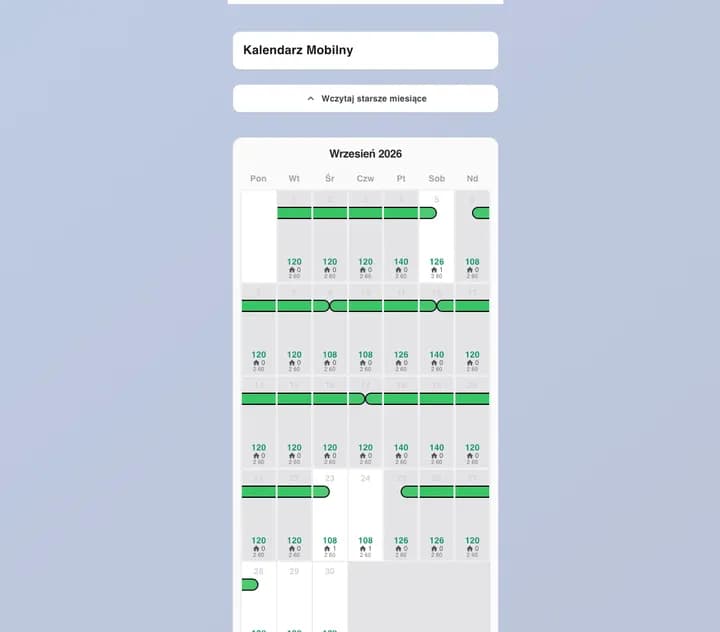
- Each day shows its price and remaining rooms; sold-out days are shaded.
- Select a date range and edit price, availability, min or max stay — it auto-saves.
- Role-based access keeps owner, manager and resident actions clear.
Why a mobile calendar matters
Guests book and cancel around the clock, and a double booking costs far more than any tool. When you can check and change availability the moment you're out of the office, you stop holding dates in your head and start responding on the spot.
Your whole portfolio in a thumb-friendly view
The property switcher lists everything you can manage, grouped by location, and remembers the property you opened last. Scroll down to move through the months; load older months with one tap as newer ones appear automatically — so reviewing next season never feels like scrolling through a spreadsheet.
Price, availability and bookings at a glance
Every day cell shows its rate and remaining availability, with sold-out days shaded so you can read a month in seconds. Reservations appear as colour-coded pills: half markers for check-in and check-out, full bars for stays that continue, and a clean split when one guest checks out and another checks in on the same day.
Update rates and availability in seconds
Long-press and drag to select a range of dates — or tap individual days — then open the bottom sheet. Change the price, the number of available rooms, the minimum or maximum stay, and the calendar auto-saves as you work, with a manual Save whenever you want. Past dates are locked, so history stays accurate.
Built around real roles, not a generic login
Owners, managers and admins each get the actions they need, residents get a read-only view, and every team member can open a reservation preview with guest name, dates, party size, phone, price and notes. Sensitive rate settings such as minimum and maximum stay are shown only to the right roles.
No app to install, always in sync
The mobile calendar runs in the browser, so there's nothing to download and update. It loads only the months you haven't seen yet and merges reservations across month boundaries, so a busy portfolio stays fast — with dark mode and pinch-zoom for comfortable use anywhere.
Frequently asked questions
Do I need to install an app?
No. It runs in your phone or tablet browser and needs no installation or updates.
Can I change prices and availability for several days at once?
Yes. Long-press and drag to select a range, then edit price, availability or min/max stay; changes auto-save.
Can I see who is booked without opening the desktop?
Yes. Reservations show directly on the calendar and open in a read-only preview with guest and stay details.
Does it work offline or in poor signal?
The calendar needs a connection to stay in sync; once loaded, moving through the months is fast and only new months are fetched.
Related articles
AI Booking Assistant: How a Virtual Assistant Increases Direct Bookings
Every accommodation owner knows the problem: visitors land on the website, look around, and leave without booking. A large part of that traffic asks the same questions — is it available? how much? is parking included? An AI Virtual Assistant answers instantly, in the guest's own language, and guides them to the right apartment.
Professional Property Management and Rental Services in Poland
We are experts in managing and renting apartments and houses in Poland. We operate mainly in Warsaw, Kraków, Wrocław and Gdańsk, running short-term tourist rentals on a commission basis and offering lease agreements for owners who prefer a fixed income.
Professional Property Management in Poland: A Guide for Landlords
Renting out property in Poland can be stable and profitable, but tenant selection, contracts, taxes and maintenance add up quickly. A professional approach — whether you hire a management company or use the right software — keeps it simple and compliant.